
Setup guide
هذا المحتوى غير متوفر بلغتك بعد.
This guide installs MirbadLLM in one of three layouts. Most fleets start with the first and grow with the second:
- Single machine: one Linux machine with an NVIDIA GPU runs the master and its own agent as two containers. It can be an old gaming tower, a GPU workstation or a DGX Spark.
- Add nodes: this is where your spare machines join. A Windows gaming PC or gaming laptop with an NVIDIA card runs llama.cpp as a native process, a Linux PC runs vLLM in containers, and an Apple Silicon Mac or MacBook runs llama.cpp on Metal or MLX. Each one serves the models that fit its memory.
- Development fleet: a master and two fake-runtime agents on one computer, for trying the UI or working on the code. No GPU or Docker is needed.
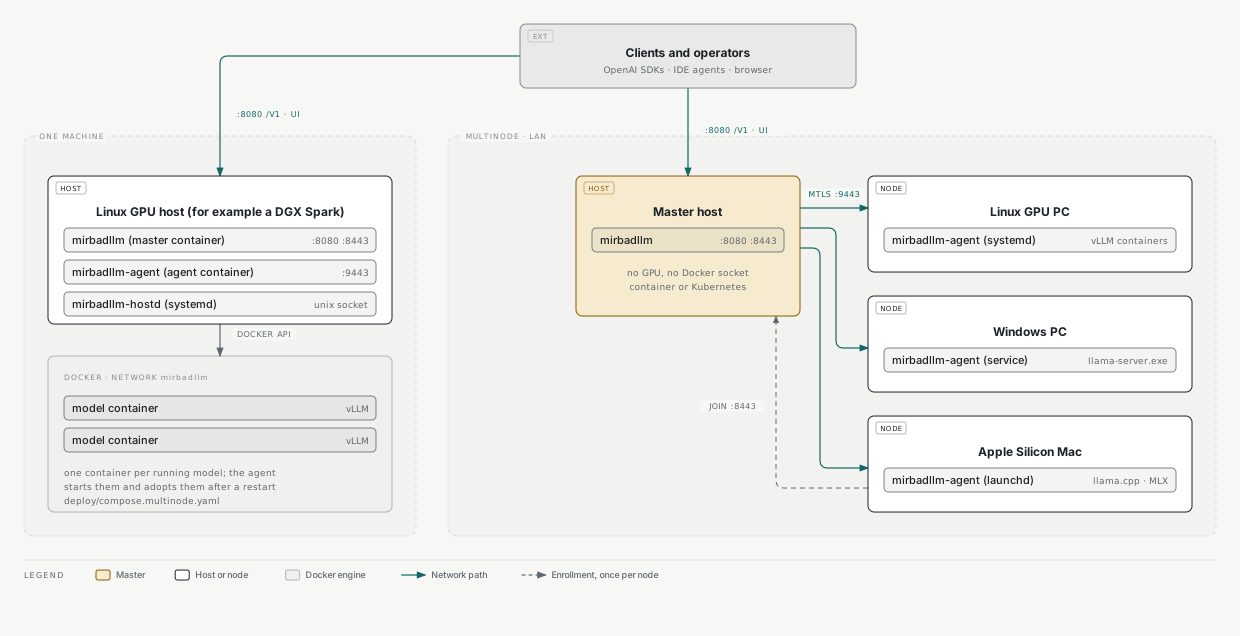
| Port | Who listens | Who connects | Notes |
|---|---|---|---|
| 8080 | Master | Browsers, API clients, joining nodes (bundle download) | UI, /api, /v1, /metrics, /healthz. Plain HTTP; put a TLS reverse proxy in front for anything beyond the LAN |
| 8443 | Master (enroll listener) | Joining nodes | TLS. Serves only enrollment and rekey, each with a one-time token |
| 9443 | Every agent | The master only | Mutual TLS. Allow it from the master’s address only |
Single machine
Section titled “Single machine”Prerequisites
Section titled “Prerequisites”- Linux on x86_64 or arm64 with an NVIDIA GPU and driver (
nvidia-smiworks). The reference deployment is a DGX Spark on DGX OS (Ubuntu 24.04). - Docker Engine with the Compose plugin and the NVIDIA Container Toolkit. Check with
docker run --rm --gpus all ubuntu nvidia-smi. - A vLLM image the machine can run. The official
vllm/vllm-openaiimages and NVIDIA’s vLLM containers for DGX Spark are common choices; check that the image supports your GPU and CPU architecture. - Disk space for the checkpoints you plan to serve.
Install
Section titled “Install”-
Clone the repository.
Terminal window git clone https://github.com/samykabu/MirbadLLM.gitcd MirbadLLM -
Create the host folders. The master runs as uid 1654 (the
appuser of the .NET image), so its folders belong to that uid.Terminal window sudo install -d -o 1654 -g 1654 /srv/mirbadllm/data /srv/mirbadllm/backupssudo install -d /srv/mirbadllm/models /srv/mirbadllm/cache -
Create
deploy/.envfrom the example and set at least these values:Terminal window cp deploy/.env.example deploy/.envstat -c %g /var/run/docker.sock # the value for DOCKER_GIDVariable Value DOCKER_GIDthe number printed above MIRBADLLM_VLLM_IMAGEyour vLLM image, for example vllm/vllm-openai:<tag>MIRBADLLM_ADMIN_PASSWORDa password for the UI MIRBADLLM_BACKUP_PASSPHRASEa passphrase for encrypted backups (keep a copy elsewhere) configuration.md lists every variable.
-
Build and start the master and the agent.
Terminal window docker compose -f deploy/compose.multinode.yaml --env-file deploy/.env up -d --buildThe master writes a bootstrap bundle on first start, and the agent enrolls from it as node
dgx, already approved. The first build takes several minutes. -
Open
http://<host>:8080/and sign in with the admin password.
The installation is complete when the Nodes page shows the node as Online and the Overview shows its memory.
docker ps lists two containers, mirbadllm (the master) and mirbadllm-agent.
The compose file runs the agent with deploy/agent/agent.dgx.json, which treats the machine as one unified memory
pool. That matches a DGX Spark and other unified-memory machines. On a PC with discrete GPUs, admission should count
each GPU’s VRAM: run only the master from this compose file and join the PC as a node with the Linux installer
(below), or adjust MemoryModel in the agent configuration.
Optional: the host agent
Section titled “Optional: the host agent”The host agent (mirbadllm-hostd) lets the node’s Services tab manage systemd units such as ComfyUI or Ollama,
and it mounts a NAS share for backups. Edit deploy/hostd/hostd.json first, then install it:
sudo bash deploy/hostd/install-hostd.shjournalctl -u mirbadllm-hostd -fWithout it the node reports Degraded with a hint, and everything else works. host-services.md describes what it may and may not do.
Add a model
Section titled “Add a model”- Open Models and choose Add model.
- Pick the runtime and the source, for example a Hugging Face repository or one GGUF variant from it.
- Enter a served name. That is the
modelvalue API clients send. - Check the runtime settings and the memory budget. The editor estimates the budget and explains each vLLM flag.
- Save, then choose Start.
A start on a large model takes a few minutes while the weights load and kernels compile. The model is ready when its state reads Ready.
Connect a client
Section titled “Connect a client”Open Access to create an API key and copy client settings. The base URL is http://<host>:8080/v1. Until the
first key exists, /v1 accepts requests without one, and the header shows a warning.
Update
Section titled “Update”Pull the new version and rebuild:
git pulldocker compose -f deploy/compose.multinode.yaml --env-file deploy/.env up -d --builddeploy/ci-deploy-multinode.sh does the same with health checks and rollback: it builds both images, redeploys the
master, then the agent, and rolls both back if either fails its health check. Run it with
MIRBADLLM_ENV_FILE=$PWD/deploy/.env bash deploy/ci-deploy-multinode.sh, or DRY_RUN=1 to print the steps.
Model containers keep running during an update, and the agent adopts them again.
Upgrading from a pre-rename install (SparkServe)
Section titled “Upgrading from a pre-rename install (SparkServe)”MirbadLLM was called SparkServe before. A host or node installed under that name upgrades in place; nothing has to be reinstalled or re-paired.
What happens on its own:
- Configuration.
SparkServe:*keys (SparkServe__*in the environment) are read asMirbadLLM:*, andSPARK_SERVE_*keys indeploy/.envasMIRBADLLM_*; a new key set in the same place wins. The master logs a warning listing the old keys it found, and so does the deploy script. - Encrypted data. Saved tokens, the backup destination’s credentials and login cookies keep their Data Protection
names, so they still decrypt. Backups made before the rename (
spark-serve-backup-*.json) are listed, pruned and restored like new ones, encrypted secrets included. - Running models. Containers labelled
spark-serve.*are adopted, not started again; new containers getmirbadllm.*labels. Downloads started before the rename resume. - The DGX. The first
deploy/ci-deploy-multinode.shrun finds the containersspark-serveandspark-serve-agent, stops them, copies their volumes intomirbadllm-agent-stateandmirbadllm-bootstrap, startsmirbadllmandmirbadllm-agenton the same ports, data folders and env file (~/spark-serve/repo/deploy/.envis still found), connects the running model containers to themirbadllmnetwork, and removes the old containers only once both new ones are healthy. If either fails, the new ones go and the old ones start again./srv/spark-serve/*and/run/spark-serve-hostdare used for as long as themirbadllmfolders do not exist.DRY_RUN=1 MIRBADLLM_RENAME_CUTOVER=1prints the steps. - Agents on PCs and Macs. Update now works on an agent installed before the rename: the master still signs
orders in the form its update helper accepts, and every bundle carries the folder name that helper looks for. The
upgrade keeps the install’s old names (systemd unit
spark-serve-agent, Windows servicespark-serve-agent, LaunchDaemoncom.spark-serve.agent, user_sparkserve, thespark-serve-agentfolders), because the identity, the folder permissions and, on Windows, the service account’s SID belong to them. Only the program inside is new. The same goes for the host agent: rerunninginstall-hostd.sh(orinstall-agent.sh install-hostdon a Mac) keepsspark-serve-hostd, its socket and its backup mount. - Agent protocol. Masters and agents send both
MirbadLLM-*andSparkServe-*headers and read either, and certificates of both trust domains are accepted, so a new master and an old agent (or the reverse) work together while the fleet is updated. New certificates still carry thespark-servetrust domain that old agents require.
What you may do by hand:
- Rename the keys in
deploy/.envtoMIRBADLLM_*and anySparkServe__*variables toMirbadLLM__*to silence the warnings. - After a successful DGX cut-over, remove the old volumes and network once you no longer want the way back:
docker volume rm spark-serve-agent-state spark-serve-bootstrapand, when no container uses it any more,docker network rm spark-serve. - Self-hosted CI runners: register the Windows and Mac runners with the labels
mirbadllm-winandmirbadllm-mac(the Linux runner keepsdgx-spark). - Metrics are now named
mirbadllm_*; update Prometheus queries and dashboards that usedspark_serve_*. - To give a PC or Mac agent the new names, uninstall it (keeping its state), install it again with the current installer and re-pair it with a rekey token from the Nodes page.
Add nodes
Section titled “Add nodes”Every node needs a reachable address the master can dial on 9443, and it must reach the master on 8080 and 8443.
- On the master, open Nodes and choose Add node. Pick the operating system.
- Copy the one-line command and run it on the new machine: in a shell with
sudoon Linux, in an elevated Windows PowerShell 5.1 window on Windows, or in Terminal on macOS. It downloads the agent bundle from the master, checks its SHA-256, installs the agent as a service and enrolls it with a one-time token. - Back on Nodes, compare the key fingerprint the command printed with the one shown, and choose Approve.
The node is ready when it shows Online and its GPUs or memory appear on its page. Each operating system has its own install guide with every option, upgrades and removal:
| Node | Runtime | Service | Guide |
|---|---|---|---|
| Linux PC with NVIDIA GPUs | vLLM in Docker containers | systemd unit mirbadllm-agent |
deploy/agent/linux/README.md |
| Windows 11 PC with an NVIDIA GPU | llama.cpp (llama-server.exe) as native processes |
Windows service mirbadllm-agent |
deploy/agent/windows/README.md |
| Apple Silicon Mac | llama.cpp with Metal, MLX through mlx_lm.server |
LaunchDaemon | deploy/agent/macos/README.md |
Once a second node is approved, the model editor shows a Placement section: pick the node and, on a PC, the GPUs. The operator guides describe placement, moves, per-node jobs and node states in depth: multi-node basics, Linux PC nodes and Windows nodes and llama.cpp.
Agent updates
Section titled “Agent updates”Every build carries its commit. A node whose agent runs another build shows Agent from another build on the Nodes page. Update it with Update now on the node’s page, Update N nodes on the Nodes page, or turn on automatic updates after each master update. The master signs an update order for that node, the agent downloads the bundle and a root helper verifies the signature against the CA saved at install time before it runs the bundle’s upgrade, which rolls back if the new agent does not come up. The agent itself never gets elevated rights. The design is in multinode/agent-updates.md.
Development fleet
Section titled “Development fleet”tools/dev-multinode runs a master and two node agents on a developer machine (Windows, Linux or macOS), with fake
models in place of vLLM containers. Agent dgx is a unified node like a DGX Spark; agent dev-b is a discrete PC
with two fake 16 GiB GPUs. Nothing touches Docker or a GPU, and everything listens on loopback.
Prerequisites
Section titled “Prerequisites”- The .NET 10 SDK, 10.0.100 or a later feature band (
global.jsonpins it). - PowerShell 7 (
pwsh) or Bash.
Start and stop
Section titled “Start and stop”pwsh tools/dev-multinode/start.ps1 -Reset # Windows, or PowerShell 7 anywheretools/dev-multinode/start.sh --reset # Linux and macOSpwsh tools/dev-multinode/stop.ps1 # or tools/dev-multinode/stop.sh| Process | Address | How it enrolls |
|---|---|---|
| master (Development) | http://127.0.0.1:5080, enroll listener https://127.0.0.1:8443 |
not applicable |
agent dgx |
https://127.0.0.1:9443, fake models on ports 18100 to 18149; unified:64 |
bootstrap bundle (pre-approved) |
agent dev-b |
https://127.0.0.1:9444, fake models on ports 18150 to 18199; discrete:2x16, 32 GiB host RAM |
join with a development join token, then approved through the node API |
The script builds the solution, starts the master and both agents, and runs a smoke step: it adds fake-dgx on
dgx and fake-devb on GPU 1 of dev-b, starts both, and sends buffered and streamed chat requests through /v1.
Skip the smoke step with -NoSmoke or --no-smoke.
State, logs (logs/*.log) and process ids live in artifacts/dev-multinode. A restart keeps the CA and both
enrollments; -Reset or --reset starts clean. Change ports with -MasterPort, -EnrollPort, -DgxPort and
-DevBPort (or the MASTER_PORT, ENROLL_PORT, DGX_PORT and DEVB_PORT environment variables).
The fake models are small vLLM-shaped HTTP servers (/health, /v1/*, /metrics), so benchmarks and tuning run
with made-up numbers. Everything else is the real agent: mTLS, fencing, the operation log, admission, events, the
proxy and telemetry. Downloads, image pulls and host services are not available on these nodes.
Both development switches refuse to run in production: the agent does not start when DevFakeRuntime is on outside
the Development environment or when its listener is not loopback-only, and the master does not start when
MirbadLLM:DevJoinTokens is set outside Development.
A Windows-only variant that adds a Windows dev agent with a fake llama-server is described in
multinode/dev-setup-windows.md.
Troubleshooting
Section titled “Troubleshooting”| Symptom | Cause | Fix |
|---|---|---|
| Model stuck in Starting | Weights still loading or kernels compiling; a few minutes is normal on large models | Wait, and read the model’s Logs tab. A failed start shows the runtime’s error there |
| 409 on start | The memory budget does not fit free memory minus the reserve | Free memory on the node, lower the budget, or force the start if you accept the risk |
413 request_too_large |
The request body is larger than 64 MiB | Send a smaller prompt or batch |
| Node shows Degraded | The host agent is missing, a GPU is busy with other work, or the agent is unreachable | The node’s page names the cause; check nvidia-smi and the agent’s service log |
| Agent from another build | The node’s agent runs a different commit than the master | Update now on the node’s page |
| Backups say Not visible yet | A NAS share was mounted on the host after the master started | Restart the master container so mount propagation picks it up |